


New 2026 Latest Questions NCP-AIO Dumps - Use Updated NVIDIA Exam
Latest NCP-AIO Exam Dumps NVIDIA Exam from Training Expert PassSureExam
NEW QUESTION # 47
Which deployment strategy allows two versions of a model to run simultaneously and gradually shifts traffic from the old version to the new version to minimize risk during updates?
- A. Blue-green deployment
- B. Canary deployment
- C. Shadow deployment
- D. Rolling update
Answer: B
Explanation:
Canary deployment introduces a new model version to a small subset of users first. Traffic is gradually increased if performance is stable. This reduces risk by allowing early detection of issues before full-scale rollout in production environments.
NEW QUESTION # 48
A system administrator is troubleshooting a Docker container that is repeatedly failing to start. They want to gather more detailed information about the issue by generating debugging logs.
Why would generating debugging logs be an important step in resolving this issue?
- A. Debugging logs fix issues related to container performance and resource allocation.
- B. Debugging logs prevent the container from being removed after it stops, allowing for easier inspection.
- C. Debugging logs disable other logging mechanisms, reducing noise in the output.
- D. Debugging logs provide detailed insights into the Docker daemon's internal operations.
Answer: D
Explanation:
Comprehensive and Detailed Explanation From Exact Extract:
Generatingdebugging logsenables detailed visibility into the internal operations of the Docker daemon. These logs expose low-level errors, misconfigurations, and runtime issues that standard logs might not capture, making them essential for diagnosing why a container repeatedly fails to start.
NEW QUESTION # 49
You are troubleshooting a performance issue with a GPU-accelerated application running on Kubernetes managed by BCM. You suspect the application is not effectively utilizing the available GPU resources. Which of the following is the MOST effective way to gather detailed performance metrics and identify potential bottlenecks within the container?
- A. Leveraging NVIDIA Nsight Systems or NVIDIA Nsight Compute to profile the application's GPU kernel execution and identify performance bottlenecks.
- B. Using "nvidia-smi' within the container to monitor GPU utilization, memory usage, and temperature.
- C. Using 'kubectl top pods' to monitor the pod's CPU and memory utilization.
- D. Analyzing the application's logs for error messages or performance warnings.
- E. Using 'kubectl exec' to run 'top' within the container and monitor process-level resource consumption.
Answer: A
Explanation:
NVIDIA Nsight Systems and NVIDIA Nsight Compute are specialized profiling tools designed to analyze the performance of GPU- accelerated applications. They provide detailed insights into kernel execution, memory access patterns, and other performance-critical aspects. 'nvidia-smi' provides basic GPU stats but not application-specific profiling. CPU/memory utilization (A, D) and application logs (B) are helpful but don't provide the necessary GPU-specific information. You may have to install it into the container's image.
NEW QUESTION # 50
A distributed BCM pipeline running on multiple nodes exhibits significant performance degradation when scaling to a larger number of nodes. Network bandwidth and storage I/O are not saturated. What's the likely cause?
- A. Inefficient data partitioning across the nodes, leading to uneven workload distribution.
- B. Insufficient CPU cores or memory on individual nodes, limiting processing capacity.
- C. Incorrect configuration of the distributed BCM framework, causing suboptimal task scheduling.
- D. Excessive communication overhead between nodes due to frequent data transfers or synchronization.
- E. All of the above.
Answer: E
Explanation:
In distributed systems, workload imbalance, communication overhead, resource limitations, and incorrect framework configuration all contribute to scaling issues.
NEW QUESTION # 51
You observe high CPU utilization during data loading in your BCM pipeline. Which of the following techniques can mitigate this bottleneck?
- A. Utilize multiple CPU threads for parallel data loading.
- B. All of the above.
- C. Implement data prefetching to load data in advance.
- D. Use a high-performance storage system (e.g., NVMe SSD).
- E. Employ data compression to reduce the data transfer volume.
Answer: B
Explanation:
A faster storage system improves data access. Data prefetching hides latency. Compression reduces transfer size. Parallel loading distributes the workload. All these options help reduce the bottleneck.
NEW QUESTION # 52
A Slurm user needs to submit a batch job script for execution tomorrow.
Which command should be used to complete this task?
- A. submit -begin=tomorrow
- B. srun -begin=tomorrow
- C. salloc -begin=tomorrow
- D. sbatch -begin=tomorrow
Answer: D
Explanation:
Comprehensive and Detailed Explanation From Exact Extract:
In Slurm cluster administration, the command to submit a batch job script is sbatch. This command schedules the job to be executed by the Slurm workload manager. The option -begin=tomorrow (or --begin=tomorrow) specifies the start time for the job execution, which in this case is set for tomorrow. The other commands have different purposes:
* submit is not a valid Slurm command.
* salloc is used to allocate resources interactively but does not submit batch jobs for scheduled execution.
* srun runs jobs immediately on allocated resources but is typically used to launch tasks in an active job or interactively, not for batch job submission.
Therefore, the correct command to submit a batch job script for future execution is sbatch -begin=tomorrow.
NEW QUESTION # 53
You are configuring BCM for cluster provisioning. You want to automate the installation of specific software packages on each newly provisioned node. How can you achieve this?
- A. Use a BCM post-provisioning script to install the packages.
- B. Include the package installation commands directly in the OS image.
- C. Create a Kubernetes Job that runs on each node to install the packages.
- D. Leverage a configuration management tool like Ansible or Chef within a BCM post-provisioning script.
- E. Specify the packages in the 'cluster.yamr file under the 'packages' section.
Answer: A,B,D
Explanation:
Including packages in the OS image is a direct approach. Post-provisioning scripts allow customization after the base OS is installed. Configuration management tools offer more sophisticated automation. Kubernetes Jobs are designed for workload execution, not system-level package management. BCM does not have a 'packages' section in 'cluster.yamr for direct package specification.
NEW QUESTION # 54
You are troubleshooting a Run.ai job that is failing with a CUDA out-of-memory error, despite requesting a seemingly sufficient amount of GPU memory. What is the MOST likely cause of this issue?
- A. The job's Docker image is corrupted.
- B. The CUDA version on the node is incompatible with the application.
- C. The requested GPU count is too low.
- D. The requested CPU count is too low.
- E. The job is using a larger batch size than the GPU memory can accommodate.
Answer: E
Explanation:
The most likely cause of a CUDA out-of-memory error, even with a seemingly sufficient GPU memory request, is that the application is trying to allocate more memory than is available on the GPU, often due to an excessively large batch size or model size. While CUDA version incompatibility can cause issues, it usually results in a different type of error. Incorrect GPU or CPU counts can lead to performance issues but not directly OOM errors. A corrupted Docker image would likely prevent the job from starting altogether.
NEW QUESTION # 55
When installing Kubernetes using BCM on NVIDIA servers, which of the following components are crucial for enabling GPU support within the cluster?
- A. NVIDIA Driver on each worker node
- B. Containerd CRI
- C. NVIDIA Container Runtime (nvidia-container-runtime)
- D. Kubernetes Device Plugin for NVIDIA GPUs
- E. kube-proxy running in IPVS mode
Answer: A,C,D
Explanation:
The Kubernetes Device Plugin allows Kubernetes to discover and manage NVIDIA GPUs. The NVIDIA Container Runtime is a low-level library that provides the necessary hooks to expose the GPUs to containers. The NVIDIA driver is the foundation for all GPU operations. Kube-proxy mode and containerd CRI are important for general kubernetes networking and containerization but do not specifically enable GPU Support. IPVS is not specifically related and Containerd is not NVIDIA specific
NEW QUESTION # 56
You suspect that 'nvsm' is not properly utilizing all available resources on your system. What metrics can you monitor to assess the resource consumption of 'nvsm' and identify potential bottlenecks?
- A. Power consumption of the NVSwitch.
- B. CPU usage, memory usage, and network 1/0.
- C. GPU utilization and memory usage.
- D. Disk I/O and filesystem latency.
- E. System uptime and kernel version.
Answer: B
Explanation:
To assess the resource utilization of 'nvsm' , you should monitor its CPU usage, memory usage, and network I/O. These metrics will provide insights into potential bottlenecks and areas where the service might be constrained.
NEW QUESTION # 57
Given the following Slurm configuration snippet in slurm.conf: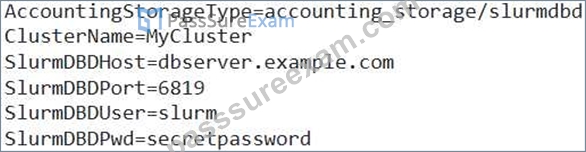
What steps are necessary to ensure that the Slurm cluster is properly connected to the SlurmDBD and that accounting data is being collected correctly?
- A. Test the connection to the database using 'sacctmgr' to create/modify account or user data.
- B. Ensure that the SlurmDBD service is running on dbserver.example.com and accessible on port 6819.
- C. Restart the Slurmctld and Slurmd daemons after making the changes to slurm.conf.
- D. Verify that the 'slurm' user has the necessary privileges on the SlurmDBD database.
- E. All of the above
Answer: E
NEW QUESTION # 58
You are using 'nvsm' to manage your NVLink fabric. You want to verify the link speed and status between two specific GPUs. Which nvsm' command provides the MOST detailed information about individual NVLink connections?
- A. nvsm show devices'
- B. 'nvsm show configuration'
- C. nvsm show links'
- D. 'nvsm show health'
- E. 'nvsm show topology'
Answer: C
Explanation:
'nvsm show links' provides detailed information about the individual NVLink connections, including their speed, status, and error counts. 'nvsm show topology' provides a high-level overview, while the other commands focus on different aspects of the system.
NEW QUESTION # 59
A data scientist reports that a Run.ai job is consistently crashing with a 'SIGKILL' signal. After verifying that the job is not exceeding its resource limits (CPU, memory, GPU), what is the MOST likely reason for this signal, and how can you diagnose it further within the Run.ai environment?
- A. The job is being preempted due to higher priority tasks, resulting in SIGKILL. Check the job's priority, quota, and resource usage history with ACM.
- B. The process is consuming a lot of disk I/O.
- C. The job is experiencing a kernel panic on the node. Check the system logs on the node for kernel-related errors.
- D. The Kubernetes liveness probe is failing, causing the pod to be restarted. Inspect the pod's events and liveness probe configuration.
- E. The Run.ai agent is terminating the job due to exceeding a pre-defined time limit. Check the job's configuration for any time limits or deadlines.
Answer: D
Explanation:
A 'SIGKILL' signal often indicates that the process was forcibly terminated by the operating system or a container runtime. A failing Kubernetes liveness probe is a common cause. If the probe fails, Kubernetes will restart the pod, sending a SIGKILL to the existing process. You can diagnose this by inspecting the pod's events using 'kubectl describe pod or 'runai describe job and examining the liveness probe configuration in the pod's YAML definition. Kernel panics, Run.ai agent time limits, and preemption are less likely to result directly in a SIGKILL signal.
NEW QUESTION # 60
You have noticed that users can access all GPUs on a node even when they request only one GPU in their job script using --gres=gpu:1. This is causing resource contention and inefficient GPU usage.
What configuration change would you make to restrict users' access to only their allocated GPUs?
- A. Modify the job script to include additional resource requests for CPU cores alongside GPUs.
- B. Set a higher priority for Jobs requesting fewer GPUs, so they finish faster and free up resources sooner.
- C. Enable cgroup enforcement in cgroup.conf by setting ConstrainDevices=yes.
- D. Increase the memory allocation per job to limit access to other resources on the node.
Answer: C
Explanation:
To restrict users' access strictly to the GPUs allocated to their jobs, Slurm uses cgroups (control groups) for resource isolation. Enabling device cgroup enforcement by setting ConstrainDevices=yes in cgroup.conf enforces device access restrictions, ensuring jobs cannot access GPUs beyond those assigned.
NEW QUESTION # 61
You are deploying BCM on a Kubernetes cluster that utilizes a custom ingress controller What configuration changes might be necessary to ensure external access to the BCM web interface?
- A. Configure the ingress controller to forward traffic to the BCM service on the appropriate port (typically 3000).
- B. Create a custom resource definition (CRD) for BCM in the ingress controller.
- C. Modify the BCM service type to 'LoadBalancer'.
- D. Update the BCM Helm chart to automatically configure the ingress controller.
- E. Disable the default ingress controller and use the custom ingress controller exclusively.
Answer: A
Explanation:
The primary configuration change required is to configure the ingress controller to forward traffic to the BCM service. This typically involves creating an ingress resource that defines the hostname and path for accessing the BCM web interface and maps it to the BCM service on the correct port (usually 3000). Changing the service type to 'LoadBalancer' might work, but it's less flexible and might not be compatible with all ingress controllers. Custom CRDs and disabling the default controller are generally unnecessary.
NEW QUESTION # 62
A system administrator needs to scale a Kubernetes Job to 4 replicas.
What command should be used?
- A. kubectl autoscale deployment job --min=1 --max=10
- B. kubectl scale job --replicas=4
- C. kubectl scale job -r 4
- D. kubectl stretch job --replicas=4
Answer: B
Explanation:
The correct command to scale a Kubernetes Job to a specific number of replicas is kubectl scale job -- replicas=4. This explicitly sets the number of desired pod instances for the Job resource.
The other commands are either invalid (stretch), apply to Deployments rather than Jobs (autoscale deployment), or use incorrect syntax (-r).
NEW QUESTION # 63
Which of the following methods are valid for configuring network settings during cluster provisioning with BCM?
- A. Using DHCP to dynamically assign IP addresses to all nodes.
- B. Integrating with an existing IPAM (IP Address Management) system via API calls during provisioning.
- C. Specifying network configuration details (IP addresses, subnet masks, gateway) within the BCM cluster configuration file.
- D. Defining network policies within Kubernetes after the cluster is provisioned.
- E. Manually configuring each node's network interface via the command line after OS installation.
Answer: A,B,C
Explanation:
BCM allows specifying network config in its config file, DHCP is a common method, and integrating with an IPAM provides automated address allocation. Manual config is inefficient for large clusters. Kubernetes policies apply after provisioning and address pod networking, not the underlying node network.
NEW QUESTION # 64
You are tasked with deploying a deep learning framework container from NVIDIA NGC on a stand-alone GPU-enabled server.
What must you complete before pulling the container? (Choose two.)
- A. Generate an NGC API key and log in to the NGC container registry using docker login.
- B. Install TensorFlow or PyTorch manually on the server before pulling the container.
- C. Install Docker and the NVIDIA Container Toolkit on the server.
- D. Set up a Kubernetes cluster to manage the container.
Answer: A,C
Explanation:
Before pulling and running an NVIDIA NGC container on a stand-alone server, you must:
Install Docker and the NVIDIA Container Toolkit to enable container runtime with GPU support.
Generate an NGC API key and authenticate with the NGC container registry using docker login to pull private or public containers.
NEW QUESTION # 65
What must be done before installing new versions of DOCA drivers on a BlueField DPU?
- A. Uninstall any previous versions of DOCA drivers.
- B. Disable network interfaces during installation.
- C. Re-flash the firmware every time.
- D. Reboot the host system.
Answer: A
Explanation:
Comprehensive and Detailed Explanation From Exact Extract:
Before installing new versions of DOCA drivers on NVIDIA BlueField DPUs, it is required touninstall any previous versionsof DOCA drivers to prevent conflicts and ensure a clean upgrade. This ensures that the new installation is not affected by leftover files or configurations from earlier versions. Re-flashing firmware or disabling network interfaces is not always required before every driver installation. Rebooting the host system might be recommended after installation but is not a prerequisite before installing drivers.
NEW QUESTION # 66
A system administrator is looking to set up virtual machines in an HGX environment with NVIDIA Fabric Manager.
What three (3) tasks will Fabric Manager accomplish? (Choose three.)
- A. Installs GPU operator
- B. Coordinates with the NVSwitch driver to train NVSwitch to NVSwitch NVLink interconnects.
- C. Coordinates with the GPU driver to initialize and train NVSwitch to GPU NVLink interconnects.
- D. Configures routing among NVSwitch ports.
- E. Installs vGPU driver as part of the Fabric Manager Package.
Answer: B,C,D
Explanation:
NVIDIA Fabric Manager is responsible for managing the fabric interconnect in HGX systems, including:
Configuring routing among NVSwitch ports (A) to optimize communication paths.
Coordinating with the NVSwitch driver to train NVSwitch-to-NVSwitch NVLink interconnects (C) for high-speed link setup.
Coordinating with the GPU driver to initialize and train NVSwitch-to-GPU NVLink interconnects (D) ensuring optimal connectivity between GPUs and switches.
NEW QUESTION # 67
An AI model deployed through Fleet Command exhibits a vulnerability. You must urgently patch all edge devices with the updated model.
What is the fastest and safest way to accomplish this, minimizing disruption to ongoing operations?
- A. Employ a staged rollout strategy within Fleet Command, gradually updating subsets of devices while monitoring for any issues before proceeding to the entire fleet.
- B. Immediately shut down all edge devices to prevent further exploitation and then update the model offline.
- C. Inform users to manually download and install the patch to all edge devices.
- D. Individually SSH into each device and manually replace the model files.
- E. Use Fleet Command to orchestrate an over-the-air (OTA) update of the model to all devices simultaneously, potentially causing temporary service interruption.
Answer: A
Explanation:
A staged rollout provides the best balance between speed and safety. It allows for early detection of potential issues during the update process, minimizing the risk of widespread disruption. Manual intervention (A) is too slow. A simultaneous update (B) could cause a large outage if problems arise. Shutting down all devices (D) is overly disruptive. User manual install (E) is not reliable or centrally controlled.
NEW QUESTION # 68
You have multiple users sharing a server with a single NVIDIAA100 GPU. Two users, Alice and Bob, want to run deep learning experiments concurrently. Alice's job requires 20GB of GPU memory and 30% of compute, while Bob's job needs IOGB of GPU memory and 20% of compute. How can you use MIG to optimally configure the GPU to accommodate both users' requirements?
- A. Create two MIG instances: one lg.5gb instance for Alice and one lg.5gb instance for Bob.
- B. Create two MIG instances: one 3g.20gb instance for Alice and one lg.5gb instance for Bob.
- C. Create one MIG instance for Alice and let Bob use the remaining GPU resources.
- D. Create two MIG instances: one 4g.20gb instance for Alice and one 2g.10gb instance for Bob.
- E. Do not use MIG; let both users share the entire GPU.
Answer: D
Explanation:
This question challenges understanding of MIG instance sizes. Options A and B are not correct because they allocate insufficient memory to Alice. Option C is not correct because it does not provide dedicated resources for Bob. Option E means that Alice's job is resource intensive. The correct answer is D because it ensures that both Alice and Bob get at least the memory they need and some compute resource allocation. 4g.20gb and 2g.10gb instances ensure allocation of resources required for both users independently.
NEW QUESTION # 69
A system administrator is troubleshooting a Docker container that is repeatedly failing to start.
They want to gather more detailed information about the issue by generating debugging logs.
Why would generating debugging logs be an important step in resolving this issue?
- A. Debugging logs fix issues related to container performance and resource allocation.
- B. Debugging logs prevent the container from being removed after it stops, allowing for easier inspection.
- C. Debugging logs disable other logging mechanisms, reducing noise in the output.
- D. Debugging logs provide detailed insights into the Docker daemon's internal operations.
Answer: D
Explanation:
Generating debugging logs enables detailed visibility into the internal operations of the Docker daemon. These logs expose low-level errors, misconfigurations, and runtime issues that standard logs might not capture, making them essential for diagnosing why a container repeatedly fails to start.
NEW QUESTION # 70
......
NVIDIA NCP-AIO Exam Syllabus Topics:
| Topic | Details |
|---|---|
| Topic 1 |
|
| Topic 2 |
|
| Topic 3 |
|
| Topic 4 |
|
Updated Test Engine to Practice NCP-AIO Dumps & Practice Exam: https://passleader.passsureexam.com/NCP-AIO-pass4sure-exam-dumps.html